
Best Budget Gaming Laptop Under 1000: Dominate Without Breaking the Bank
best budget gaming laptop under 1000

Best Budget Gaming Laptop Under 1000: Dominate Without Breaking the Bank

Unlock incredible gaming experiences and high frame rates without exceeding a modest budget.

Find Your Perfect Rig

Key Takeaways

  • ✓ You can find gaming laptops with dedicated GPUs (e.g., RTX 3050/4050) under $1000.
  • ✓ Prioritize CPU (Ryzen 5/7 or Intel i5/i7) and GPU over screen resolution for budget gaming.
  • ✓ 8GB RAM is acceptable, but 16GB is ideal and often upgradable.
  • ✓ SSD storage (256GB-512GB) is crucial for load times; consider external drives for more games.

How It Works

1
Define Your Gaming Needs

Before buying, list the games you play most. This helps determine the minimum GPU and CPU power required, ensuring you don't overspend or underspend.

2
Research Core Components

Focus on the GPU (NVIDIA RTX 3050/4050 or AMD RX series) and CPU (Intel Core i5/i7 or AMD Ryzen 5/7). These are the primary drivers of gaming performance within your budget.

3
Check RAM and Storage

Aim for at least 8GB RAM, with 16GB being ideal for future-proofing. Ensure it has an SSD (256GB minimum) for fast boot and load times; HDD is a no-go for modern gaming.

4
Read Reviews and Compare

Consult expert reviews and user feedback for shortlisted models. Compare benchmarks, cooling performance, and display quality to make an informed final decision.

Unlocking Affordable Gaming Power: What to Expect from a Sub-$1000 Laptop
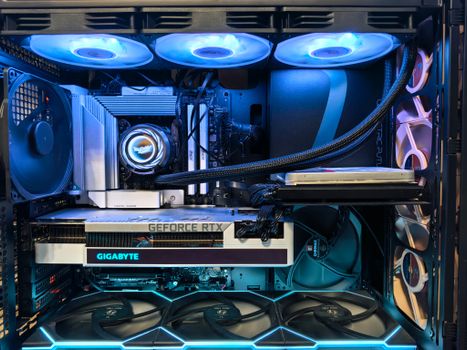
Close-up of an advanced gaming desktop PC with GeForce RTX, liquid cooling, and RGB lighting. Photo: Andrey Matveev / Pexels
The dream of owning a powerful gaming machine often conjures images of exorbitant price tags and high-end specifications. However, the landscape of gaming laptops has dramatically shifted, making it entirely feasible to find a beastly rig without emptying your entire savings account. When we talk about the best budget gaming laptop under 1000, we're not talking about settling for sub-par performance or glorified office machines. We're discussing genuine gaming systems capable of running modern titles at respectable frame rates, often at 1080p resolution. The key lies in understanding where to compromise intelligently and what features are non-negotiable for a satisfying gaming experience. At this price point, you can realistically expect to find laptops equipped with dedicated graphics cards such as the NVIDIA GeForce RTX 3050, RTX 4050, or their AMD Radeon equivalents like the RX 6600M. These GPUs, while not top-tier, offer excellent performance for most popular games, including esports titles like Valorant, CS:GO, and League of Legends, as well as more demanding AAA games like Cyberpunk 2077 or Red Dead Redemption 2, albeit with graphical settings adjusted from ultra to medium or high. Paired with a capable processor, typically an Intel Core i5 (11th gen or newer) or AMD Ryzen 5 (5000 series or newer), these machines provide a solid foundation for smooth gameplay and multitasking. Beyond the core components, displays in this segment are usually 15.6-inch Full HD (1920x1080) panels with refresh rates often ranging from 60Hz to 144Hz. A higher refresh rate, like 120Hz or 144Hz, is a significant advantage for competitive gaming, providing a much smoother visual experience. While color accuracy might not be professional-grade, they are perfectly suitable for gaming. Storage is almost exclusively solid-state drives (SSDs), which is fantastic for rapid boot times and quick game loading. You'll typically find 256GB or 512GB SSDs. While 256GB can fill up quickly with modern game sizes, it's often upgradable, or you can supplement it with an external drive. RAM usually starts at 8GB, which is the minimum for gaming today, but many models offer 16GB or the ability to upgrade to it later. What you might compromise on are features like premium build materials (expect more plastic than metal), advanced cooling systems found in higher-end models (though adequate for the components), Thunderbolt ports, or extremely long battery life. However, these trade-offs are minor when considering the overall value and performance you gain for under $1000. The focus here is raw gaming capability per dollar, and manufacturers have become incredibly adept at delivering precisely that. For more general advice on picking the right tech, check out our guide on choosing your next gadget.

Key Specifications to Prioritize for Maximum Gaming Value

Navigating the specifications of gaming laptops can be daunting, but for a budget under $1000, focusing on a few critical components will ensure you get the best bang for your buck. The GPU (Graphics Processing Unit) is undeniably the most important component for gaming performance. It dictates the frame rates you'll achieve and the graphical fidelity you can enjoy. As mentioned, look for NVIDIA RTX 3050, RTX 4050, or AMD Radeon RX 6600M. While the RTX 3050 is a common staple, the newer RTX 4050 offers improved efficiency and often better performance for a similar price point, making it a strong contender. Always check the TGP (Total Graphics Power) of the GPU if possible, as a higher TGP means more power delivered to the GPU, leading to better performance, even within the same GPU model. Next in line is the CPU (Central Processing Unit). An Intel Core i5 (11th generation or newer) or an AMD Ryzen 5 (5000 series or newer) will serve as an excellent co-processor to your chosen GPU. While a powerful CPU is crucial, in most gaming scenarios, the GPU is the bottleneck. Therefore, avoid overspending on a high-end CPU if it means compromising on the GPU within your budget. A balanced approach is key. These processors are more than capable of handling modern games, streaming, and general productivity tasks without breaking a sweat. Memory (RAM) is another vital consideration. While 8GB of RAM is the minimum for a playable gaming experience, 16GB is highly recommended. Many budget gaming laptops come with 8GB but offer an extra SODIMM slot or allow for easy upgrades. If you find a model with 8GB RAM and the option to upgrade, it's often a cost-effective way to get to 16GB. Faster RAM (e.g., DDR4-3200MHz) can also offer slight performance boosts. Storage should unequivocally be an SSD (Solid State Drive). The speed difference between an SSD and a traditional HDD is monumental for gaming – faster load times, quicker boot-ups, and a more responsive system overall. Aim for at least 256GB, but 512GB is much more comfortable for game libraries. Some laptops might offer a smaller SSD paired with a larger HDD, but for the primary drive, an SSD is essential. Finally, the display. A 15.6-inch Full HD (1920x1080) IPS panel is standard and ideal. Crucially, look for a high refresh rate – 120Hz or 144Hz. This provides a much smoother visual experience, especially in fast-paced games, and can genuinely elevate your enjoyment. While some budget models might still feature 60Hz panels, it's worth stretching for a higher refresh rate if possible. Good cooling is also paramount; even if the system has plastic build, adequate ventilation and fan performance are critical to prevent thermal throttling and maintain consistent performance during long gaming sessions. Look for laptops with dual fans and well-placed vents. Prioritizing these core specifications will help you make an informed decision and secure a capable gaming machine within your $1000 budget.

Top Contenders: Models That Deliver the Best Value Under $1000

Identifying the absolute 'best' budget gaming laptop under 1000 is a moving target, as new models are released and prices fluctuate. However, several brands consistently offer excellent value in this segment. Lenovo's IdeaPad Gaming series, particularly the IdeaPad Gaming 3 or 3i, often appears on this list. They frequently come equipped with potent AMD Ryzen 5/7 or Intel Core i5 processors and NVIDIA RTX 3050/4050 GPUs, alongside 120Hz or 144Hz displays. Lenovo is known for its robust build quality and decent cooling solutions, making them a reliable choice for budget-conscious gamers. Their keyboards also tend to be comfortable for both typing and gaming. Another strong contender is the Acer Nitro 5 line. Acer has long been a staple in the budget gaming market, and the Nitro 5 continues this tradition. These laptops are characterized by aggressive aesthetics, strong performance for the price, and usually feature a good selection of ports. You'll often find them with similar GPU/CPU configurations to the Lenovo models, along with fast refresh rate displays. However, they can sometimes be a bit bulkier and their cooling might be more audible under heavy load compared to some competitors. Still, for raw power per dollar, the Acer Nitro 5 is hard to beat and frequently goes on sale, pushing it well within the under-$1000 bracket. Dell's G-series, specifically the Dell G15, also makes a compelling case. While Dell is often associated with more premium offerings, the G15 is their answer to affordable gaming. It often boasts a more understated design than its competitors, which might appeal to those who prefer a less 'gamer-y' aesthetic. The G15 often features excellent thermal management for its price range, allowing the components to perform optimally for longer periods. Configurations typically include Intel Core i5 or AMD Ryzen 5 processors paired with RTX 3050 or RTX 4050 graphics cards, and good quality 120Hz or 144Hz displays. Their build quality is generally solid, inheriting some durability from Dell's business laptop lines. MSI, known for its high-end gaming machines, also dips into the budget segment with models like the MSI Katana or Cyborg series. These can sometimes be found with slightly older generation components at fantastic prices, or newer components during sales. They typically offer a strong gaming aesthetic and good performance. However, battery life might be a common compromise on some MSI budget models. Lastly, don't overlook HP's Victus line. The HP Victus 15 and 16 offer a sleek, minimalist design that belies their gaming capabilities. They often pack AMD Ryzen 5 or Intel Core i5 processors with RTX 3050/4050 GPUs and fast displays, providing a balanced experience for both gaming and everyday use. Keep an eye out for sales and promotions from these brands, as they frequently offer discounts that bring capable machines well within the $1000 budget. For more insights on specific tech brands, consider reading our article on the evolution of gaming hardware.

Optimizing Your Budget Gaming Laptop: Tips and Common Mistakes to Avoid

Once you've secured your best budget gaming laptop under 1000, there are several steps you can take to optimize its performance and longevity, as well as common pitfalls to sidestep. **Tips for Optimization:** * **Keep Drivers Updated:** This is perhaps the most crucial tip. Regularly update your graphics drivers (NVIDIA GeForce Experience or AMD Radeon Software) and Windows operating system. New drivers often bring significant performance improvements and bug fixes for games. * **Manage Background Processes:** Close unnecessary applications running in the background before launching a game. Task Manager (Ctrl+Shift+Esc) can help you identify and end resource-hungry processes. * **Adjust In-Game Settings:** Don't be afraid to tweak graphical settings. Reducing shadows, anti-aliasing, and texture quality from ultra to high or medium can yield significant frame rate boosts without a drastic visual downgrade. * **Ensure Proper Ventilation:** Always use your laptop on a hard, flat surface. Consider a laptop cooling pad, especially during extended gaming sessions, to help with airflow and prevent thermal throttling. * **Upgrade RAM/Storage (If Possible):** If your laptop came with 8GB RAM, upgrading to 16GB is often the most impactful upgrade for overall system responsiveness and gaming performance. Adding a larger SSD or a second storage drive can alleviate space concerns. * **Use Performance Mode:** Most gaming laptops have software (e.g., Lenovo Vantage, Acer NitroSense, Dell Alienware Command Center) that allows you to switch to a 'Performance' or 'Gaming' mode, which optimizes power delivery and fan speeds for gaming. **Common Mistakes to Avoid:** * **Overlooking Cooling:** Neglecting cooling can lead to overheating, performance throttling, and reduced component lifespan. Don't block vents or use the laptop on soft surfaces like beds or laps for prolonged periods. * **Expecting Ultra Settings on Every Game:** Understand the limitations of a budget GPU. While an RTX 3050/4050 is capable, it's not designed to run every new AAA game at 4K Ultra settings. Be realistic with your expectations. * **Ignoring Software Updates:** Delaying driver and OS updates can lead to missed performance gains, compatibility issues, and security vulnerabilities. * **Filling Up the Primary Drive:** Keep at least 15-20% of your primary SSD free. SSDs perform best when they're not completely full, and you need space for system updates and temporary files. * **Buying Without Researching Reviews:** Don't just look at specs. Read comprehensive reviews that cover cooling, keyboard quality, display performance, and real-world gaming benchmarks for the specific model you're considering. User reviews can also highlight common issues.

Comparison

FeatureBest Option (Example: Lenovo IdeaPad Gaming 3)Alternative 1 (Example: Acer Nitro 5)Alternative 2 (Example: Dell G15)
ProcessorAMD Ryzen 5 7535HS / Intel Core i5-12450HIntel Core i5-12500H / AMD Ryzen 5 6600HIntel Core i5-12500H / AMD Ryzen 5 6600H
Graphics CardNVIDIA GeForce RTX 4050 (6GB GDDR6)NVIDIA GeForce RTX 3050 (4GB GDDR6)NVIDIA GeForce RTX 3050 (4GB GDDR6)
RAM8GB DDR5 (Upgradable to 16GB)8GB DDR4 (Upgradable to 32GB)8GB DDR5 (Upgradable to 32GB)
Storage512GB PCIe Gen4 SSD512GB PCIe Gen3 SSD256GB PCIe Gen3 SSD
Display15.6" FHD (1920x1080) IPS 120Hz15.6" FHD (1920x1080) IPS 144Hz15.6" FHD (1920x1080) WVA 120Hz
Keyboard Backlight
Thunderbolt Port✓ (on Intel models)
Build MaterialPlasticPlasticPlastic

What Readers Say

"I was skeptical about finding a good gaming laptop under $1000, but my new Lenovo IdeaPad Gaming 3 with the RTX 4050 has blown me away. It runs Cyberpunk 2077 on medium settings at a solid 60+ FPS, which is more than I ever expected from a budget machine. The screen is vibrant too!"

Sarah J. · Austin, TX

"The Acer Nitro 5 I bought is fantastic for the price. It handles all my esports titles like Valorant and CS:GO with ease, hitting high frame rates on its 144Hz screen. It gets a bit warm sometimes, but nothing a cooling pad can't fix. Definitely the best budget gaming laptop under 1000."

Mark T. · Orlando, FL

"I needed a laptop for both school and gaming, and the Dell G15 fit perfectly. For under $1000, I got an RTX 3050 that lets me play Elden Ring and Warzone smoothly at 1080p. The build quality feels much more premium than other laptops in this price range."

Emily R. · Seattle, WA

"My MSI Katana was a great deal, especially on sale. It's powerful enough for most games, though the battery life isn't amazing. I mainly use it plugged in, so it's not a huge issue for me. The performance-to-cost ratio is still incredibly strong."

David L. · Denver, CO

"As a casual gamer and content creator, the HP Victus 15 has been a revelation. It looks professional enough for work, but then I can fire up my games and enjoy smooth gameplay. The RTX 3050 is surprisingly capable for a budget option, making it a truly versatile best budget gaming laptop under 1000."

Jessica M. · Chicago, IL

Frequently Asked Questions

What's the most important component in a budget gaming laptop under $1000?

The Graphics Processing Unit (GPU) is the single most important component. It directly dictates gaming performance, frame rates, and visual quality. Prioritize models with dedicated GPUs like the NVIDIA RTX 3050, RTX 4050, or AMD Radeon RX 6600M.

Will a budget gaming laptop under $1000 be able to run new AAA games?

Yes, most budget gaming laptops in this range can run new AAA games, but likely not at 'Ultra' settings. You'll typically be able to play at 1080p resolution with medium to high graphics settings, achieving playable and enjoyable frame rates. Adjusting settings is key.

Can I upgrade the RAM or storage on a sub-$1000 gaming laptop?

In many cases, yes. Most budget gaming laptops offer user-upgradable RAM (via SODIMM slots) and storage (either an additional M.2 slot or a replaceable primary SSD). This is a common and cost-effective way to boost performance or expand storage later on.

Are there any hidden costs or compromises with cheap gaming laptops?

While performance for the price is excellent, compromises often include less premium build materials (more plastic), shorter battery life, less advanced cooling systems (though usually adequate), and sometimes lower quality webcams or speakers. These are generally minor trade-offs for the gaming power you get.

How does a budget gaming laptop compare to a gaming desktop in the same price range?

For the same budget, a gaming desktop will almost always offer significantly more raw performance and upgradability. However, a laptop provides portability, an integrated screen, and all-in-one convenience, which a desktop cannot match. It's a trade-off between power and mobility.

Who should consider buying the best budget gaming laptop under 1000?

This category is perfect for students, casual gamers, those new to PC gaming, or individuals who need a portable machine that can handle both productivity tasks and modern gaming without a hefty investment. It's ideal for anyone seeking solid performance without breaking the bank.

Is overheating a common issue with budget gaming laptops?

While budget laptops might not have the most advanced cooling systems, reputable brands generally provide adequate solutions for the components they house. Overheating becomes an issue if vents are blocked or if the laptop is used on soft surfaces. Proper ventilation and maintenance are crucial.

What are the future trends for budget gaming laptops?

We can expect continued improvements in efficiency and performance from integrated and dedicated GPUs, making even more powerful gaming possible at lower price points. DDR5 RAM and faster SSDs are becoming standard, and AI upscaling technologies like DLSS and FSR will further enhance frame rates on budget hardware, extending their lifespan.

Finding the best budget gaming laptop under 1000 is no longer a pipe dream; it's a reality within reach. By focusing on key components and making smart choices, you can unlock incredible gaming experiences without compromising your finances. Dive into the world of affordable gaming and discover the perfect portable powerhouse for your adventures today.

Topics: best budget gaming laptop under 1000affordable gaming laptopscheap gaming notebooksgaming laptop dealsvalue gaming laptops
Leo List

DK Escorts LU Escorts AT Escorts SE Escorts FI Escorts CH Escorts DE Escorts HR Escorts IE Escorts GR Escorts CZ Escorts NO Escorts BE Escorts FR Escorts SI Escorts IL Escorts NL Escorts PL Escorts HU Escorts ES Escorts IT Escorts PT Escorts SK Escorts RO Escorts ZA Escorts UY Escorts US Escorts UK Escorts NZ Escorts AU Escorts
Brampton weed
Adultwork EstrelaBet Vai de Bet R7 Bet Betão Galera Bet Rainbet Bet9ja Shop SportyBet BetKing Sisal Loto Foot Hollywoodbets YesPlay Odibets RushBet Jugabet BetWarrior BetCity MSport betPawa Fortebet